MatplotlibChart
Displays a Matplotlib chart.
To display a Matplotlib figure with a built-in toolbar UI, use
MatplotlibChartWithToolbar.
This control requires the matplotlib
Python package to be installed.
See this installation guide for more information.
Inherits: GestureDetector
Properties
figure- Matplotlib figure to draw - an instance ofmatplotlib.figure.Figure.
Events
on_message- The event is triggered on figure message update.on_toolbar_buttons_update- Triggers when toolbar buttons status is updated.
Methods
back- Goes back to the previous view.builddownload- Downloads the current figure in the specified format.forward- Goes forward to the next view.home- Resets the view to the original state.pan- Activates the pan tool.send_binary- Sends a binary message to the front end.send_json- Sends a JSON message to the front end.send_message- Sends a message to the figure's canvas manager.will_unmount- Called when the control is about to be removed from the page.zoom- Activates the zoom tool.
Examples
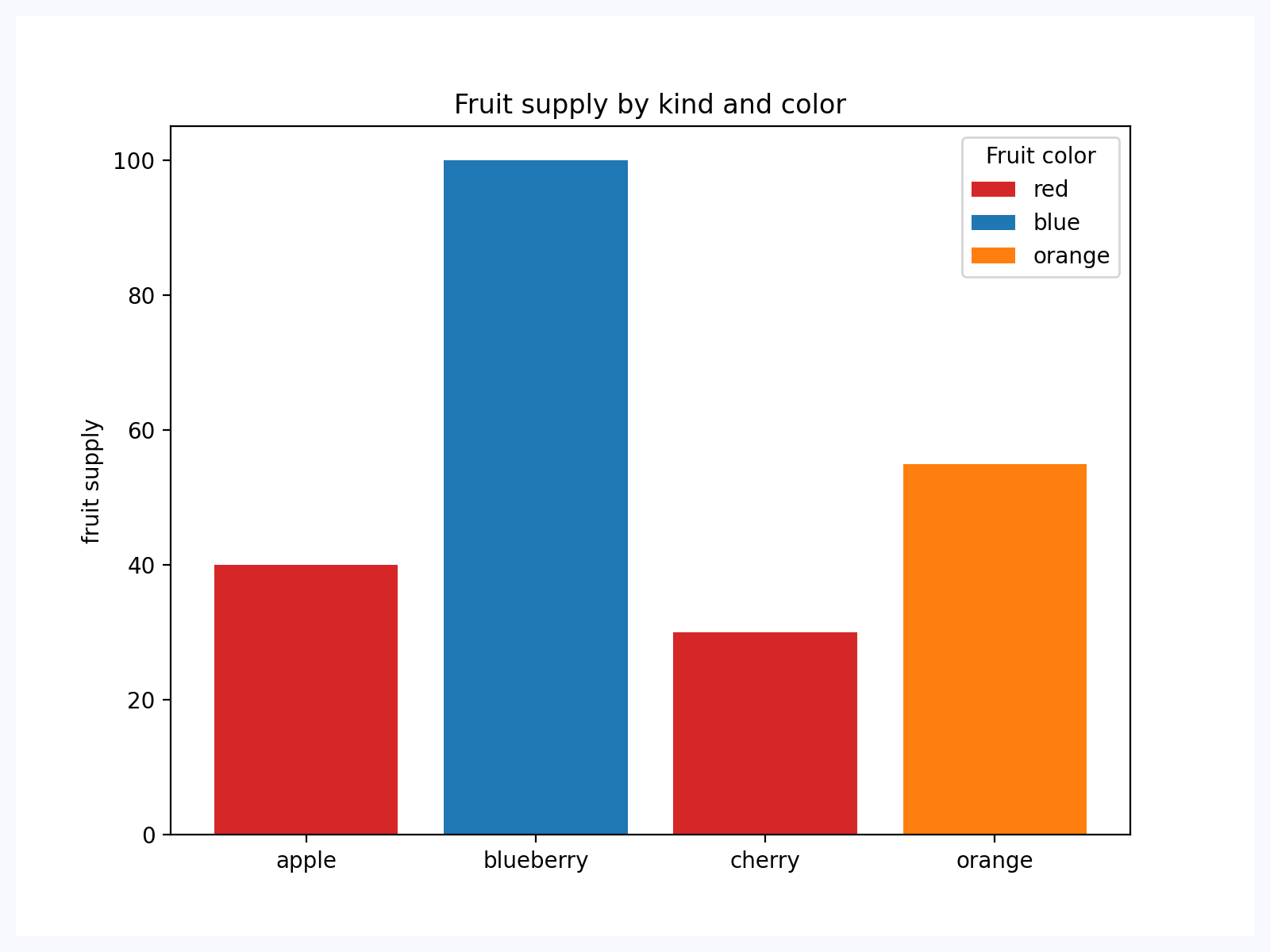
Bar Chart
Based on an official Matplotlib example.
import os
import sys

# Load Matplotlib's `ft2font` extension with RTLD_DEEPBIND, so it binds to the
# FreeType and harfbuzz it was built against.
#
# A packaged Linux app embeds Python in the Flutter process, where GTK has
# already loaded the system libfreetype/libharfbuzz into the global symbol
# namespace. `ft2font` statically links its own copies but also exports their
# symbols, so its internal calls resolve to the system ones instead. The ABI
# mismatch corrupts glyph metrics - a 10pt "-40" measures millions of points
# wide - and every text draw then fails with
# "FT_Render_Glyph ... error 0x62: raster overflow".
#
# Must run before Matplotlib is imported: the extension is cached after its
# first load. No-op wherever the flag is absent (macOS, Windows, Android, iOS,
# Pyodide) - none of those resolve symbols through a flat global namespace.
if hasattr(os, "RTLD_DEEPBIND"):
    _dlopenflags = sys.getdlopenflags()
    sys.setdlopenflags(_dlopenflags | os.RTLD_DEEPBIND)
    try:
        from matplotlib import ft2font  # noqa: F401
    finally:
        sys.setdlopenflags(_dlopenflags)


import matplotlib.pyplot as plt

import flet as ft
import flet_charts as fch


def main(page: ft.Page):
    fig, ax = plt.subplots()

    fruits = ["apple", "blueberry", "cherry", "orange"]
    counts = [40, 100, 30, 55]
    bar_labels = ["red", "blue", "_red", "orange"]
    bar_colors = ["tab:red", "tab:blue", "tab:red", "tab:orange"]

    ax.bar(fruits, counts, label=bar_labels, color=bar_colors)

    ax.set_ylabel("fruit supply")
    ax.set_title("Fruit supply by kind and color")
    ax.legend(title="Fruit color")

    page.add(
        ft.SafeArea(
            expand=True,
            content=fch.MatplotlibChart(figure=fig, expand=True),
        )
    )


if __name__ == "__main__":
    ft.run(main)
Properties
figureclass-attributeinstance-attribute
figure: Figure = field(metadata={'skip': True})Matplotlib figure to draw - an instance of
matplotlib.figure.Figure.
Events
on_messageclass-attributeinstance-attribute
on_message: (
    EventHandler[MatplotlibChartMessageEvent] | None
) = None
The event is triggered on figure message update.
on_toolbar_buttons_updateclass-attributeinstance-attribute
on_toolbar_buttons_update: (
    EventHandler[
        MatplotlibChartToolbarButtonsUpdateEvent
    ]
    | None
) = None
Triggers when toolbar buttons status is updated.
Methods
build
build()download
download(format) -> bytesDownloads the current figure in the specified format. Args: format (str): The format to download the figure in (e.g., 'png', 'jpg', 'svg', etc.). Returns: bytes: The figure image in the specified format as a byte array.
send_binary
send_binary(blob)Sends a binary message to the front end.
Receives PNG bytes from matplotlib's stock full/diff path, or a
(width, height, rgba) tuple from FigureManagerFletAgg.refresh_all
in raw mode. This method runs synchronously inside refresh_all()
(same stack as draw()), which is the last safe moment to copy the
raw buffer — it aliases the live Agg buffer that the next draw
mutates in place. encode_raw_frame performs that one copy while
assembling the wire packet.