CupertinoButton
An iOS-style button.
Example:
ft.CupertinoButton("Tap me")

Inherits: LayoutControl, ActionControl
Properties
alignment- The alignment of this button's content.autofocus- Whether this button should be selected as the initial focus when no other node in its scope is currently focused.bgcolor- The background color of this button.border_radius- The radius of the button's corners when it has a background color.color- The color of this button's text.content- The content of this button.disabled_bgcolor- The background color of this button when disabled.focus_color- The color to use for the focus highlight for keyboard interactions.icon- An icon shown in this button.icon_color- The foreground color of theicon.min_size- The minimum size of this button.mouse_cursor- The cursor for a mouse pointer when it enters or is hovering over this button.opacity_on_click- Defines the opacity of the button when it is clicked.padding- The amount of space to surround thecontentcontrol inside the bounds of the button.size- The size of this button.url- The URL to open when this button is clicked.
Events
on_blur- Called when this button loses focus.on_click- Called when a user clicks this button.on_focus- Called when this button receives focus.on_long_press- Called when a user long-presses this button.
Methods
focus- Requests focus for this control.
Examples
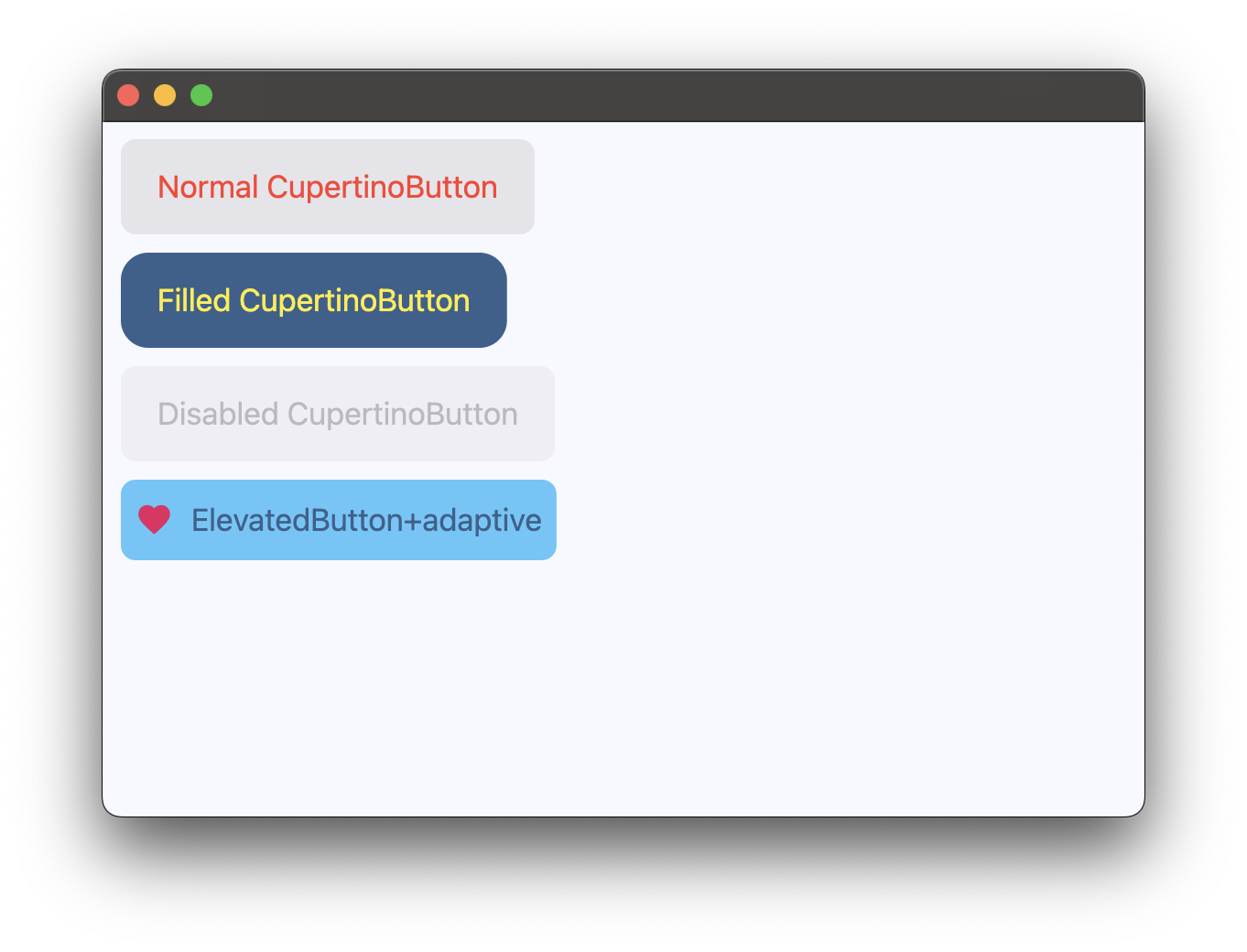
CupertinoButton
import flet as ft


def main(page: ft.Page):
    page.add(
        ft.SafeArea(
            content=ft.Column(
                controls=[
                    ft.CupertinoButton(
                        bgcolor=ft.CupertinoColors.LIGHT_BACKGROUND_GRAY,
                        opacity_on_click=0.3,
                        on_click=lambda _: print("Normal CupertinoButton clicked!"),
                        content=ft.Text(
                            value="Normal CupertinoButton",
                            color=ft.CupertinoColors.DESTRUCTIVE_RED,
                        ),
                    ),
                    ft.CupertinoButton(
                        bgcolor=ft.Colors.PRIMARY,
                        alignment=ft.Alignment.TOP_LEFT,
                        border_radius=ft.BorderRadius.all(15),
                        opacity_on_click=0.5,
                        on_click=lambda _: print("Filled CupertinoButton clicked!"),
                        content=ft.Text(
                            "Filled CupertinoButton",
                            color=ft.Colors.YELLOW,
                        ),
                    ),
                    ft.CupertinoButton(
                        bgcolor=ft.Colors.PRIMARY,
                        disabled=True,
                        alignment=ft.Alignment.TOP_LEFT,
                        opacity_on_click=0.5,
                        content=ft.Text("Disabled CupertinoButton"),
                    ),
                    ft.Button(
                        adaptive=True,
                        bgcolor=ft.CupertinoColors.SYSTEM_TEAL,
                        content=ft.Row(
                            tight=True,
                            controls=[
                                ft.Icon(ft.Icons.FAVORITE, color="pink"),
                                ft.Text("Button+adaptive"),
                            ],
                        ),
                    ),
                ],
            ),
        )
    )


if __name__ == "__main__":
    ft.run(main)
Properties
alignmentclass-attributeinstance-attribute
alignment: Alignment | None = field(
    default_factory=lambda: Alignment.CENTER
)
The alignment of this button's content.
Typically buttons are sized to be just big enough to contain the child and its padding. If the button's size is constrained to a fixed size, this property defines how the child is aligned within the available space.
autofocusclass-attributeinstance-attribute
autofocus: bool = FalseWhether this button should be selected as the initial focus when no other node in its scope is currently focused.
bgcolorclass-attributeinstance-attribute
bgcolor: ColorValue | None = NoneThe background color of this button.
border_radiusclass-attributeinstance-attribute
border_radius: BorderRadiusValue = field(
    default_factory=lambda: BorderRadius.all(8.0)
)
The radius of the button's corners when it has a background color.
colorclass-attributeinstance-attribute
color: ColorValue | None = NoneThe color of this button's text.
contentclass-attributeinstance-attribute
content: StrOrControl | None = NoneThe content of this button.
disabled_bgcolorclass-attributeinstance-attribute
disabled_bgcolor: ColorValue | None = NoneThe background color of this button when disabled.
focus_colorclass-attributeinstance-attribute
focus_color: ColorValue | None = NoneThe color to use for the focus highlight for keyboard interactions.
Defaults to a slightly transparent bgcolor.
If bgcolor is None, defaults to a slightly transparent
CupertinoColors.ACTIVE_BLUE.
'Slightly transparent' in this context means the color is used with an opacity
of 0.80, a brightness of 0.69 and a saturation of 0.835.
iconclass-attributeinstance-attribute
icon: IconDataOrControl | None = NoneAn icon shown in this button.
icon_colorclass-attributeinstance-attribute
icon_color: ColorValue | None = NoneThe foreground color of the icon.
min_sizeclass-attributeinstance-attribute
min_size: Size | None = NoneThe minimum size of this button.
mouse_cursorclass-attributeinstance-attribute
mouse_cursor: MouseCursor | None = NoneThe cursor for a mouse pointer when it enters or is hovering over this button.
opacity_on_clickclass-attributeinstance-attribute
opacity_on_click: Number = 0.4Defines the opacity of the button when it is clicked.
When not pressed, the button has an opacity of 1.0.
Raises:
- ValueError - If it is not between
0.0and1.0, inclusive.
paddingclass-attributeinstance-attribute
padding: PaddingValue | None = NoneThe amount of space to surround the content control inside the bounds of the button.
sizeclass-attributeinstance-attribute
The size of this button.
Events
on_blurclass-attributeinstance-attribute
on_blur: ControlEventHandler[CupertinoButton] | None = NoneCalled when this button loses focus.
on_clickclass-attributeinstance-attribute
on_click: ControlEventHandler[CupertinoButton] | None = NoneCalled when a user clicks this button.
on_focusclass-attributeinstance-attribute
on_focus: ControlEventHandler[CupertinoButton] | None = NoneCalled when this button receives focus.
on_long_pressclass-attributeinstance-attribute
on_long_press: (
    ControlEventHandler[CupertinoButton] | None
) = None
Called when a user long-presses this button.