Draggable
A control that can be dragged from to a DragTarget.
When a draggable control recognizes the start of a drag gesture, it displays the
content_feedback control that tracks the user's finger across the screen.
If the user lifts their finger while on top of a DragTarget, this target is
given the opportunity to complete drag-and-drop flow.
Inherits: Control
Properties
affinity- Specifies the axis along which this control competes with other gestures to initiate a drag.axis- Restricts the draggable's movement to a specific axis.content- The control to display when the draggable is not being dragged.content_feedback- The control to show under the pointer when a drag is under way.content_when_dragging- The control to display instead ofcontentwhen this draggable is being dragged.group- The group this draggable belongs to.max_simultaneous_drags- Specifies how many simultaneous drag operations are allowed for this draggable.
Events
on_drag_complete- Called when this draggable is dropped and accepted by aDragTarget.on_drag_start- Called when this draggable starts being dragged.
Examples
Drag and drop containers
import flet as ft


def main(page: ft.Page):
    def handle_drag_will_accept(e: ft.DragWillAcceptEvent):
        e.control.content.border = ft.Border.all(
            2,
            ft.Colors.BLACK_45 if e.accept else ft.Colors.RED,
        )
        e.control.update()

    def handle_drag_accept(e: ft.DragTargetEvent):
        e.control.content.bgcolor = e.src.content.bgcolor
        e.control.content.border = None
        e.control.update()

    def handle_drag_leave(e: ft.DragTargetLeaveEvent):
        e.control.content.border = None
        e.control.update()

    page.add(
        ft.SafeArea(
            content=ft.Row(
                controls=[
                    ft.Column(
                        controls=[
                            ft.Draggable(
                                group="color",
                                content=ft.Container(
                                    width=50,
                                    height=50,
                                    bgcolor=ft.Colors.CYAN,
                                    border_radius=5,
                                ),
                                content_feedback=ft.Container(
                                    width=20,
                                    height=20,
                                    bgcolor=ft.Colors.CYAN,
                                    border_radius=3,
                                ),
                            ),
                            ft.Draggable(
                                group="color",
                                content=ft.Container(
                                    width=50,
                                    height=50,
                                    bgcolor=ft.Colors.YELLOW,
                                    border_radius=5,
                                ),
                            ),
                            ft.Draggable(
                                group="color",
                                content=ft.Container(
                                    width=50,
                                    height=50,
                                    bgcolor=ft.Colors.GREEN,
                                    border_radius=5,
                                ),
                            ),
                        ],
                    ),
                    ft.Container(width=100),
                    ft.DragTarget(
                        group="color",
                        on_will_accept=handle_drag_will_accept,
                        on_accept=handle_drag_accept,
                        on_leave=handle_drag_leave,
                        content=ft.Container(
                            width=50,
                            height=50,
                            bgcolor=ft.Colors.BLUE_GREY_100,
                            border_radius=5,
                        ),
                    ),
                ],
            ),
        )
    )


if __name__ == "__main__":
    ft.run(main)
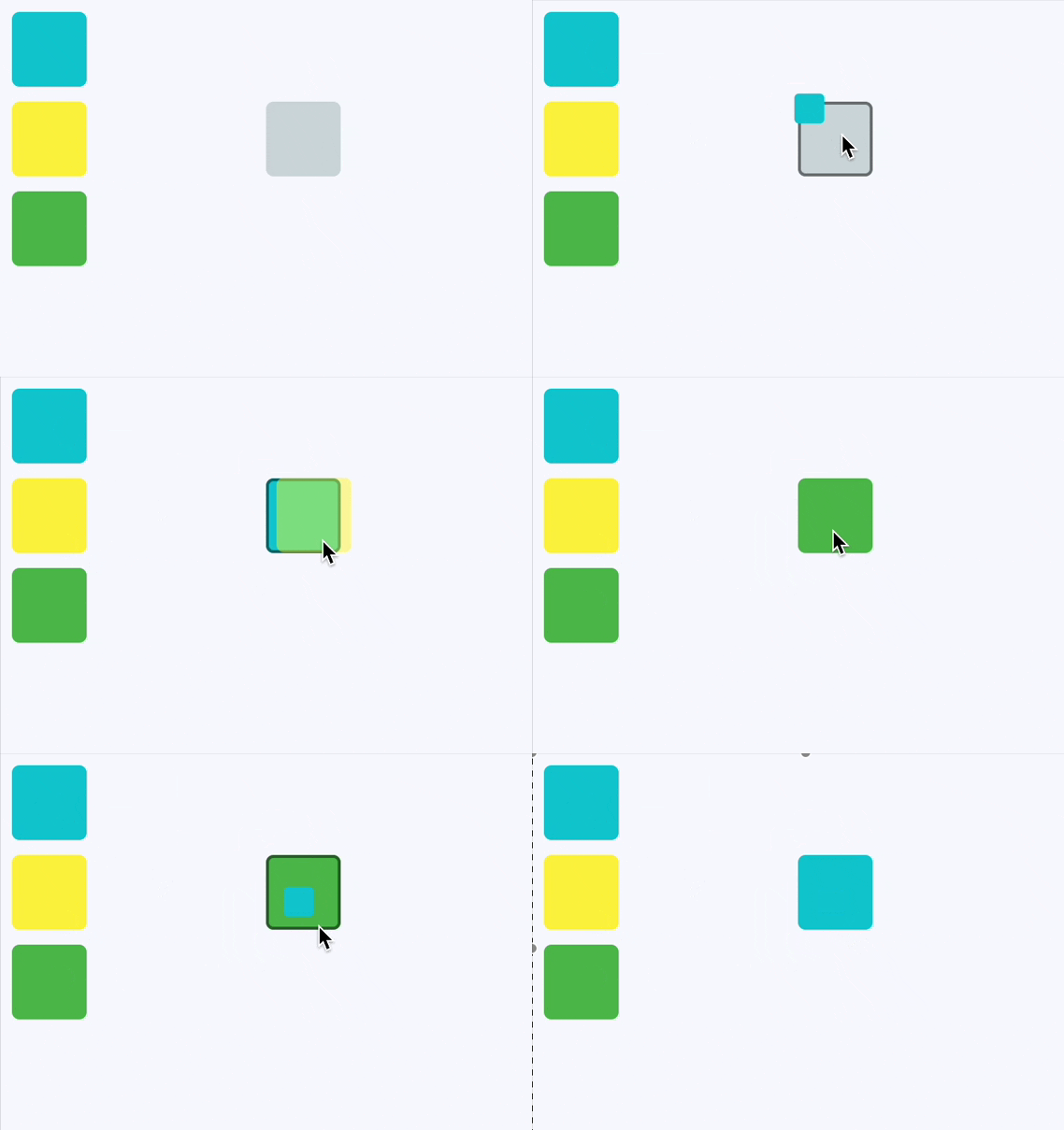
Drag and drop containers declarative
from dataclasses import dataclass

import flet as ft


@dataclass
@ft.observable
class TargetState:
    bgcolor: ft.Colors = ft.Colors.BLUE_GREY_100
    is_drag_over: bool = False


@ft.component
def App():
    target, _ = ft.use_state(lambda: TargetState())

    def on_will_accept(_: ft.DragWillAcceptEvent):
        target.is_drag_over = True

    def on_accept(e: ft.DragTargetEvent):
        target.bgcolor = e.src.data
        target.is_drag_over = False

    def on_leave(_: ft.DragTargetLeaveEvent):
        target.is_drag_over = False

    return ft.SafeArea(
        content=ft.Row(
            controls=[
                ft.Column(
                    controls=[
                        ft.Draggable(
                            group="color",
                            data=ft.Colors.CYAN,
                            content=ft.Container(
                                width=50,
                                height=50,
                                bgcolor=ft.Colors.CYAN,
                                border_radius=5,
                            ),
                            content_feedback=ft.Container(
                                width=20,
                                height=20,
                                bgcolor=ft.Colors.CYAN,
                                border_radius=3,
                            ),
                        ),
                        ft.Draggable(
                            group="color",
                            data=ft.Colors.YELLOW,
                            content=ft.Container(
                                width=50,
                                height=50,
                                bgcolor=ft.Colors.YELLOW,
                                border_radius=5,
                            ),
                        ),
                        ft.Draggable(
                            group="color",
                            data=ft.Colors.GREEN,
                            content=ft.Container(
                                width=50,
                                height=50,
                                bgcolor=ft.Colors.GREEN,
                                border_radius=5,
                            ),
                        ),
                    ],
                ),
                ft.Container(width=100),
                ft.DragTarget(
                    group="color",
                    on_will_accept=on_will_accept,
                    on_accept=on_accept,
                    on_leave=on_leave,
                    content=ft.Container(
                        width=50,
                        height=50,
                        bgcolor=target.bgcolor,
                        border=(
                            ft.Border.all(2, ft.Colors.BLACK_45)
                            if target.is_drag_over
                            else None
                        ),
                        border_radius=5,
                    ),
                ),
            ],
        ),
    )


def main(page: ft.Page):
    page.render(App)


if __name__ == "__main__":
    ft.run(main)
Properties
affinityclass-attributeinstance-attribute
affinity: Axis | None = NoneSpecifies the axis along which this control competes with other gestures to initiate a drag.
- If
None, the drag starts as soon as a tap down gesture is recognized, regardless of direction. - If set to
Axis.HORIZONTALorAxis.VERTICAL, the control will only initiate a drag when the gesture matches the specified axis, allowing it to compete with other gestures in that direction.
axisclass-attributeinstance-attribute
axis: Axis | None = NoneRestricts the draggable's movement to a specific axis.
Axis.HORIZONTAL: Only allows horizontal dragging.Axis.VERTICAL: Only allows vertical dragging.None: Allows dragging in any direction.
contentinstance-attribute
content: ControlThe control to display when the draggable is not being dragged.
If the draggable is being dragged, the
content_when_dragging is displayed instead.
Raises:
- ValueError - If it is not visible.
content_feedbackclass-attributeinstance-attribute
content_feedback: Control | None = NoneThe control to show under the pointer when a drag is under way.
content_when_draggingclass-attributeinstance-attribute
content_when_dragging: Control | None = NoneThe control to display instead of content when this draggable is being dragged.
If set, this control visually replaces content during an active drag operation,
allowing you to show a different appearance or an "empty" placeholder.
If None, the original content remains visible while dragging.
groupclass-attributeinstance-attribute
group: str = 'default'The group this draggable belongs to.
For a DragTarget to accept an incoming drop from a Draggable,
they must both be in the same group.
max_simultaneous_dragsclass-attributeinstance-attribute
max_simultaneous_drags: int | None = NoneSpecifies how many simultaneous drag operations are allowed for this draggable.
0- disables dragging entirely.1- allows only one drag at a time. For a better user experience, you may want to provide an "empty" widget forcontent_when_draggingto visually indicate the item is being moved.- any other positive integer - allows that many concurrent drags.
None- no limit on the number of simultaneous drags.
Raises:
- ValueError - If it is not greater than or equal to
0.
Events
on_drag_completeclass-attributeinstance-attribute
on_drag_complete: ControlEventHandler[Draggable] | None = (
    None
)
Called when this draggable is dropped and accepted by a DragTarget.
on_drag_startclass-attributeinstance-attribute
on_drag_start: ControlEventHandler[Draggable] | None = NoneCalled when this draggable starts being dragged.